
How to Track Chemicals Across Multiple Sites
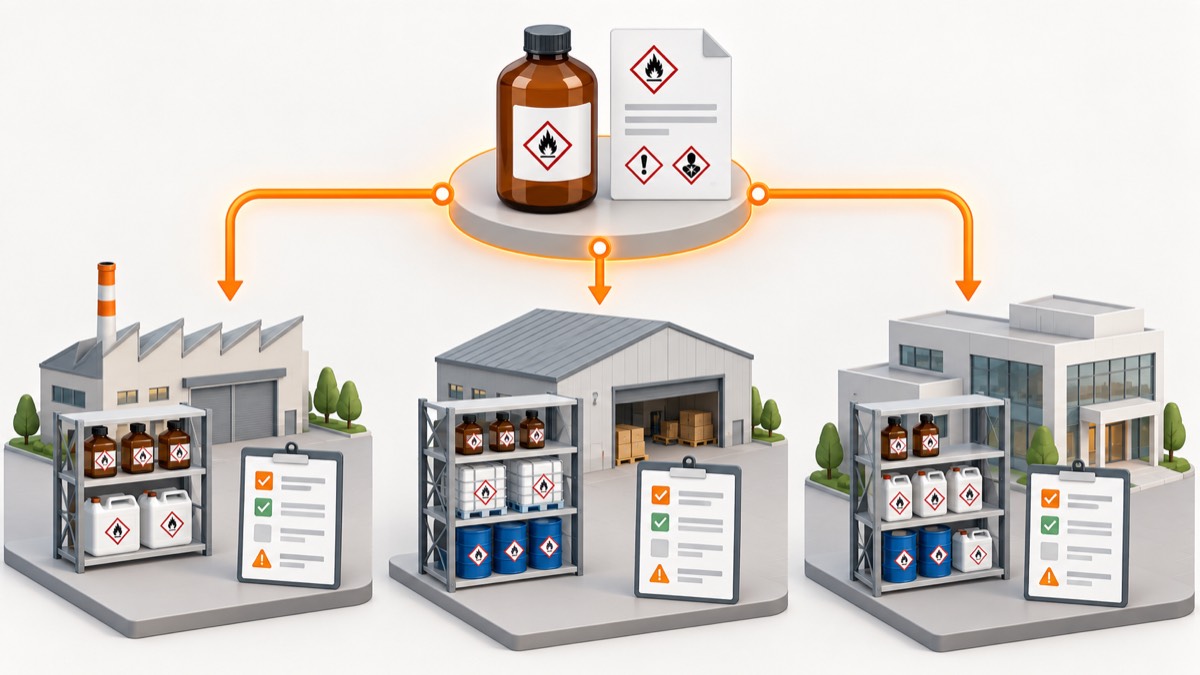
- Multi-site chemical tracking works best with one controlled product record and separate site, location and container records.
- Shared SDS and hazard data should not erase local quantities, tasks, controls, emergency arrangements or assessment ownership.
- Transfers need explicit dispatch and receipt events so stock never disappears between sites.
- Site-level reconciliation and central data-quality measures reveal gaps without removing local accountability.
Track chemicals across multiple sites by separating shared product information from local inventory and assessment context. Use one verified product and SDS record, then attach site-specific quantities, storage locations, containers, owners and task assessments. This avoids duplicate documents while preserving what is different at each workplace.
Which data should be shared across sites?
Share information that genuinely describes the supplied product. This usually includes product name and code, supplier, concentration, physical form, classification, active SDS version and core storage information.
Do not duplicate this record for every site unless the formulation or supplier differs. A central correction should update the product source once and trigger review wherever it is used.
Which data must stay local?
Keep workplace facts at the site or location level. These include:
- quantity and number of containers;
- building, room, cabinet and shelf;
- local owner and department;
- receipt, opened and expiry details where relevant;
- storage condition and inspection status;
- task, frequency, duration and people exposed;
- COSHH and DSEAR assessments;
- emergency, waste and contractor arrangements;
- local approvals and training.
HSE stresses that an SDS cannot account for the particular workplace environment (HSE COSHH FAQ). One shared SDS may therefore support several different assessments.
What record structure works for multiple sites?
Use a hierarchy that reflects physical reality. A practical model is:
| Level | Example | Key data |
|---|---|---|
| Organisation | Group | Governance and shared catalogue |
| Site | Leeds plant | Site owner and emergency context |
| Location | Paint store cabinet 2 | Inspection, access and local limits |
| Product | Solvent cleaner X | Supplier, SDS and classification |
| Container or stock line | 5 L bottle 0041 | Quantity, batch, status and movement |
| Assessment | Spray-gun cleaning | Task-specific exposure and controls |
Safe Foundry's chemical register features can connect these layers without forcing each site to rebuild the same product record.
How should receiving and transfers work?
Record every arrival and cross-site transfer as a controlled event. At receiving, verify product, supplier, code, SDS status, quantity, destination and assessment approval. Do not allow a local purchase to bypass the central catalogue.
For transfers:
- create a dispatch event with source, item, quantity and destination;
- mark the stock in transit rather than immediately at the destination;
- verify receipt and condition;
- assign the exact local location;
- confirm the receiving site has the right assessment and storage;
- close discrepancies and preserve both users and timestamps.
This prevents the common “moved from Site A” record without proof that Site B received or approved it.
How do you manage SDS updates across sites?
A new SDS should create one controlled revision and many visible review tasks. Identify all sites and assessments linked to the product. Each site reviewer then checks local use, controls and worker information.
Do not mark every site complete when the central team uploads a PDF. Document which sites reviewed it, the outcome and unresolved actions. The SDS-to-assessment workflow should separate document distribution from assessment approval.
How should permissions and ownership be divided?
Central governance and local accountability need different permissions. Central roles may control product matching, SDS verification and taxonomy. Local roles should manage stock, locations, inspections and task assessments within their site.
Use least-privilege access and an audit history. A site user should not accidentally edit the shared hazard record for every workplace; a central user should not close a local action without site evidence.
How do you reconcile a multi-site inventory?
Reconcile by location locally and monitor data quality centrally. Each site should perform physical checks and resolve missing, duplicate, wrong-location and unregistered stock.
Central measures can include:
- sites overdue for reconciliation;
- products without verified current SDSs;
- stock without an owner or location;
- transfers open too long;
- assessments awaiting review after an SDS change;
- unlabelled or quarantined items;
- recurring discrepancies by site.
Rank by risk and age instead of comparing sites only by raw exception count. A small site with one unidentified reactive chemical may need faster attention than a large site with several naming corrections.
How should local differences be handled?
Standardise the minimum data model while allowing justified local fields and controls. Sites may have different storage layouts, languages, processes, emergency contacts or enforcement context. Preserve those differences without forking the shared product record.
Define mandatory organisation-wide fields, status names and transfer rules. Let sites add local procedures, assessment detail and location metadata. Review custom fields periodically so the system does not become twenty incompatible spreadsheets online.
What should a rollout look like?
Pilot the model at one representative site, then migrate in controlled waves. Clean product duplicates, map locations, verify SDS matches and perform a physical reconciliation before calling the site live.
Train receiving, users, site owners and central reviewers on their own workflows. Keep a documented cutover and exception log. Use the help centre for register and location guidance.
The goal is a single view that answers both enterprise and local questions: which products exist across the organisation, and exactly what is present, approved and controlled at this site today?
How should product duplicates be resolved across sites?
Create a controlled matching process rather than merging on name alone. Compare supplier, product code, concentration, physical form and SDS. Preserve local aliases so users can still search familiar names.
Where two sites buy equivalent-looking products from different suppliers, keep separate product records unless equivalence is established. A central category can group them for reporting without pretending the formulations and source documents are identical.
Nominate a data steward for disputed matches. Record why records were merged or kept separate and retain the old identifiers for import and audit history.
How should site onboarding be validated?
Use a physical walkdown and sample trace before declaring a site live. Check representative stores, points of use, mobile stock, waste and rarely visited cupboards. From each selected container, reach the correct product, active SDS, location and assessment.
Then reverse the direction: choose records from the system and find the physical stock. Reconcile quantities and status. Include difficult examples such as decanted containers, old formulations and stock shared by departments.
The local owner should sign off unresolved exceptions and interim controls. Central completeness metrics cannot replace knowledge of a hidden maintenance cupboard.
What happens when sites use different suppliers?
Keep the task need distinct from the supplied product. Sites may use different brands for the same purpose, but assessments must be based on the exact product and local process. A central approved-product list can show preferred alternatives while retaining each verified SDS.
When procurement changes supplier, trigger product matching and assessment review at affected sites. Do not overwrite the old product record if stock remains or historical assessments relied on it.
How should emergency access work?
Define access that remains usable during network, power or identity-provider failure. The assessment should identify which product, quantity and location information responders need and how an authorised current copy is maintained.
Offline arrangements must have an owner and refresh method. A static export can become misleading if sites assume it is live. Test the procedure during drills and after material location changes.
How can central governance avoid slowing local work?
Set service levels and clear exception routes. Sites need a fast process for new products, transfers and urgent maintenance while central verification protects shared data. Use provisional or quarantine states rather than encouraging users to bypass the system.
Review queues and bottlenecks across sites. If approvals routinely take longer than operations can tolerate, fix resourcing or rules rather than accepting shadow spreadsheets as inevitable.
Frequently asked questions
Should every site keep its own SDS library?
Sites can use a shared verified library when it preserves access, local review and offline arrangements. Avoid uncontrolled duplicate files with uncertain versions.
Can one COSHH assessment cover several sites?
Only when the task, product, exposure, people and controls are genuinely equivalent and local differences are addressed. Record the scope explicitly.
Who owns a chemical during transfer?
Define responsibility in the transfer workflow, including dispatch, transport within the organisation, receipt and discrepancy handling.
How often should sites reconcile inventory?
Set a risk-based schedule using movement, hazard and data quality, supported by event updates and more frequent rolling checks where needed.
Check that an SDS matches your chemical by comparing product identifiers, supplier, concentration, form, label classification and intended use.
Chemical Stocktake Checklist: What to Record and CheckUse this chemical stocktake checklist to reconcile containers with your register, verify SDS links, find storage issues and assign follow-up actions.
COSHH Assessment Review Checklist for UK WorkplacesUse this COSHH assessment review checklist to compare records with current tasks, products, exposure routes, controls and workplace evidence.